Youth leaders running outdoor programs have recording responsibilities that serve several purposes at once. The records support participant development tracking, leader accreditation, incident reporting and organisational compliance. Getting the recording right means the same log entry serves all of these without copying information between different systems.
One part is often left out: your own record as a leader. This guide covers what to record for your participants and your program, and then how to log your leadership hours, the time you spend running activities, so it is ready when a qualification, a re-registration or an assessor asks for it. It comes from about 15 years as a Scout leader in the Blue Mountains, and over 40 years of Scouting.
Participant Records
For youth programs, the participant list for each activity is important: who attended, in what role, and what their experience level was at the time. Over multiple activities this builds a picture of each participant's progress through different activity types and grades. For programs with progressive achievement systems, this tracking is directly tied to what can be awarded.
Leader Records: Log Your Own Leadership Hours
The log should record which leaders were present and in what capacity. A leader delivering an activity counts differently to a leader assisting one. For leaders working toward higher qualifications, activity hours are earned in specific roles rather than just in attendance. Recording this accurately from the start avoids trying to reconstruct it during an application.
Keep two records apart. Your own experience is what you did as a participant: the distance you walked, the grades you climbed, the nights you camped. Your leadership is what you did to run the activity for others: leading, instructing, rigging, safety and support. A day spent rigging and belaying for a Cub abseil is real leadership time, but it is not your own abseiling experience. Mixing the two overstates one and hides the other.
What to Record for Each Leadership Duty
- Your role, such as Activity leader, Instructor, Rigger, Sweep, First aider or Quartermaster
- Setup and preparation hours: planning, gear checks, rigging
- Running hours: leading, instructing or supervising the activity itself
- Pack-down hours: de-rigging, gear return and follow-up
- How many people you looked after
- Runs or sessions, if they matter for your activity (descents, groups, sessions)
- Who can verify it, such as the name and role of the person in charge
- Notes an assessor would want: what you set up or ran, and the conditions
If you had more than one role on the day, record each one separately. An abseil day where you were Activity leader and also rigged the ropes is two duties, with their own hours.
How to Log Leadership Hours in Logs Kept Simple
Every log in Logs Kept Simple, whether a hike, paddle, abseil or canyon, camp, pioneering project, ride, boating trip, alpine trip or aquatics session, now has a Your involvement section with two questions.
- Open a new or existing log and go to Your involvement.
- Answer "I took part myself" (Yes, or No if you only ran it) and set "I ran or helped run it" to Yes.
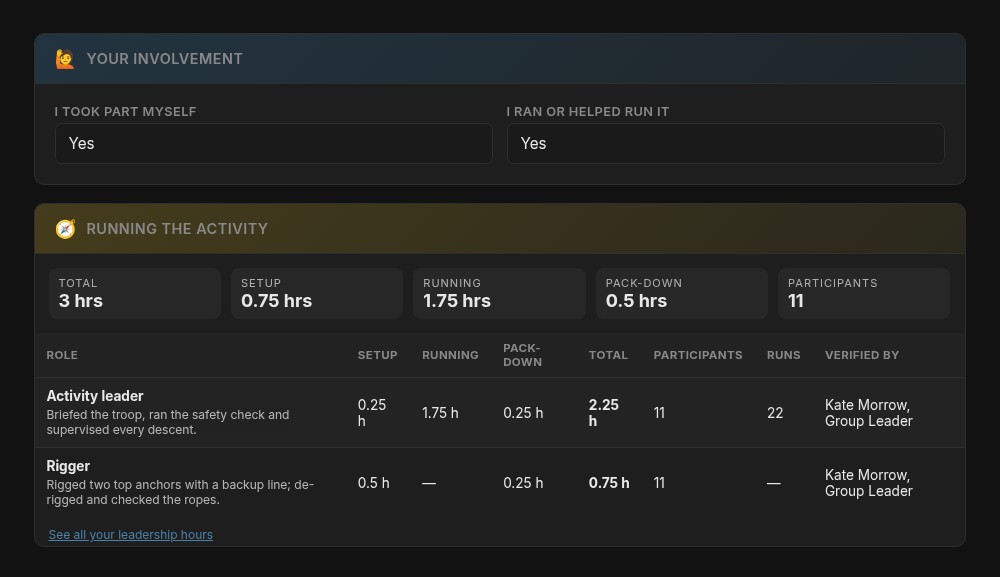
- The Running the activity section opens. If you led the whole thing, tap Quick fill: it sets the first duty to Activity leader, its running hours to the activity's duration, and its participants to the number of people listed under People.
- Add the rest: setup and pack-down hours, runs or sessions, who can verify it, and notes.
- Tap Add another duty for each extra role. The total updates as you type.
- Save the log.
Worked Example: A Scout Abseil Day
A Scout troop abseil at Mount York with 11 Scouts. As Activity leader you spent 0.25 hours on the briefing and safety check, 1.75 hours supervising descents and 0.25 hours packing down, which is 2.25 hours. You also rigged the two top anchors (0.5 hours) and de-rigged them (0.25 hours), which is a second duty of 0.75 hours. The log shows 3 hours of leadership, 11 people looked after (counted once, not once per role), and 22 descents if you record runs.
Your Leadership Page
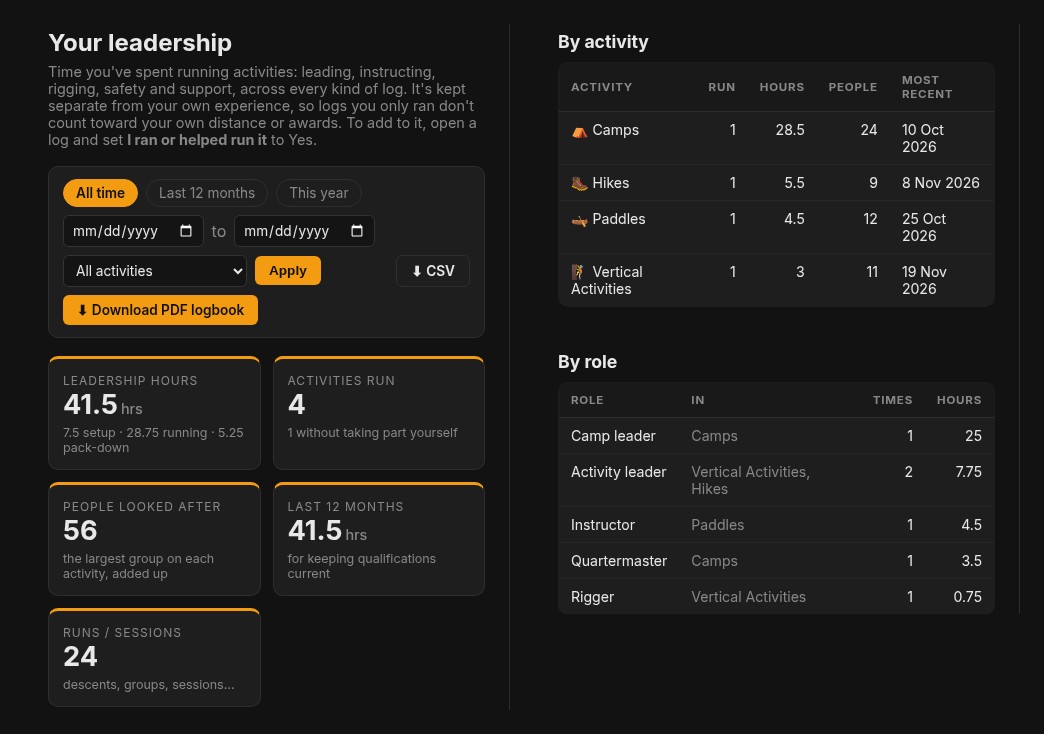
All of your duties add up on the My Leadership page in the menu. It shows your total leadership hours (split into setup, running and pack-down), how many activities you ran and how many of those you ran without taking part, the people you looked after, your hours in the last 12 months for keeping qualifications current, and your runs or sessions.
Below that are tables by activity and by role, and a logbook of every duty with its date, place, hours, people and verifier. Filter by all time, the last 12 months, this year, a date range or one kind of activity.
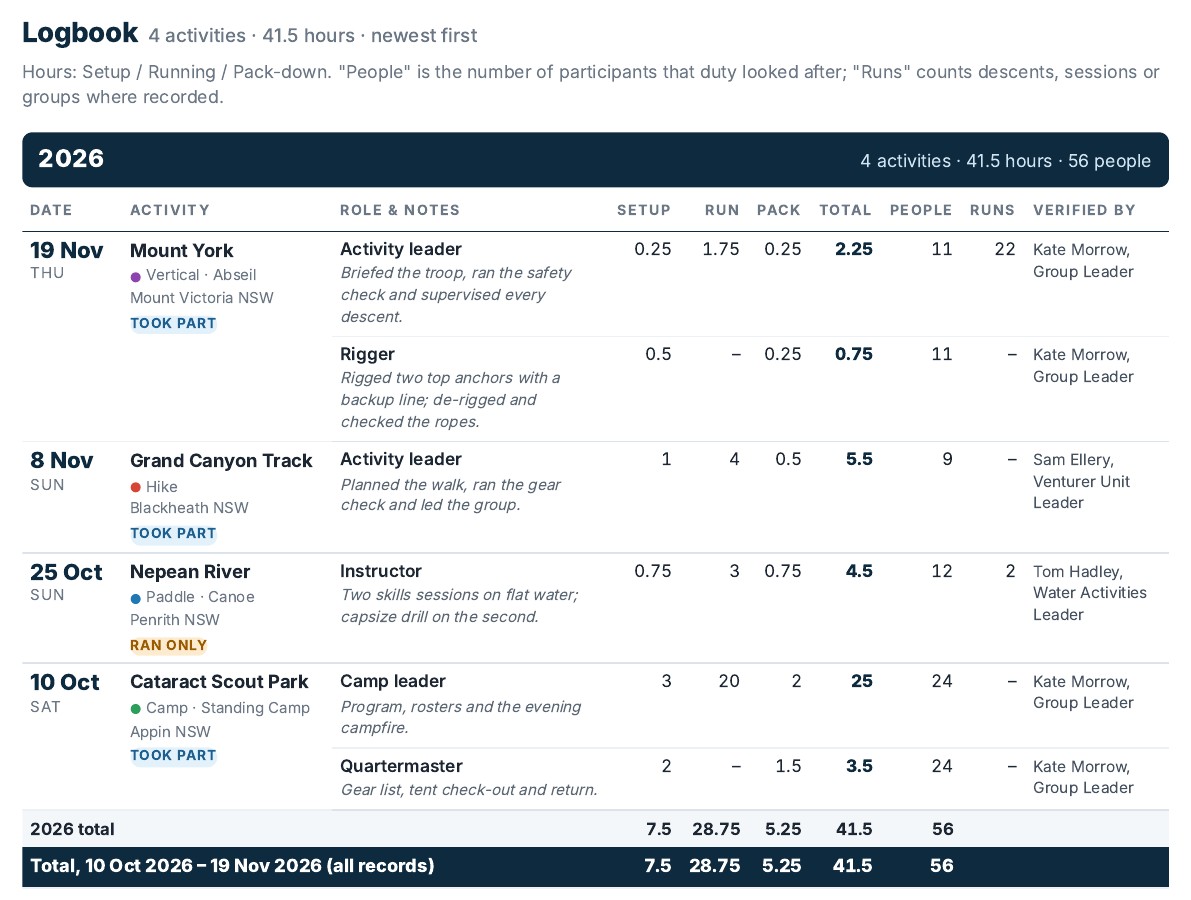
When someone needs to see it, download the PDF logbook. It is laid out as a document for an assessor: a summary page with your key figures and hours by activity and role, the logbook by year with subtotals and a grand total, and a declaration and verification page with space for a signature and a document reference. A CSV download is there for spreadsheets.
Logs You Led Before
If you marked yourself as Leader or Co-Leader on logs before this feature existed, the Leadership page lists them under Led before duties were recorded, each with an Add hours link. Open one, answer Yes to I ran or helped run it, and add the duties.
Who This Helps
- Scout and Guide leaders keeping their adult leader records up to date
- Outdoor instructors and guides who need evidence of recent leading experience
- Duke of Ed supervisors and assessors who support adventurous journeys
- School and club leaders who run activities without always taking part
Check what your own organisation or qualification asks for. The record does not replace their forms, but it means the numbers are already there when you fill them in.
Risk Assessments and Activity Plans
Linking the risk assessment and activity plan to the activity log creates a complete record of the planning and delivery of the program. If something goes wrong and the organisation needs to demonstrate due diligence, having the risk assessment, the plan and the actual log linked together is far more defensible than having them in separate places or missing entirely.
LogsKeptSimple for Youth Programs
Logs Kept Simple supports group-based logging where participants are listed against an activity, and your own role and duties are recorded on every log. With the activity plan and risk assessment tools, all the documentation for a program activity can be managed in one place, and your leadership hours build up as you go.
Related: What Outdoor Leaders Should Record for Youth Programs covers participant information, incidents, safeguarding and how long to keep records.
Frequently Asked Questions
Does a log I only ran count toward my own distance or awards?
No. If you answer No to "I took part myself", the log counts toward your leadership hours only. It is left out of your own distance, stats, awards and list totals.
Can I record more than one role on the same activity?
Yes. Add a duty for each role you had, such as Activity leader and Rigger on an abseil day. Each duty has its own hours, and the log shows the total.
How is "people looked after" counted?
For each activity it takes the largest group across your duties, so the same Scouts are not counted twice when you had two roles. The Leadership page adds those numbers up across activities.
Can I give my leadership record to an assessor?
Yes. The Leadership page downloads a branded PDF logbook: a summary, every activity by year with subtotals, and a declaration and verification page to sign. There is also a CSV download.
What about activities I led before this feature existed?
Logs where your role was Leader or Co-Leader are listed under "Led before duties were recorded" on the Leadership page, with an Add hours link to each one.
Is it free?
Yes. Logging, the Leadership page, the CSV and the PDF logbook are free.
Start logging your leadership free at Logs Kept Simple. Open any log, and answer Yes to I ran or helped run it.